
Receipt scanner for Google Sheets
Turn a receipt photo or PDF into an expense row you can review, sort and share. Gexpense records the details in your own Google Sheet and keeps the original in your Google Drive.
Free to start with a monthly scan allowance. The CSV tool works without signup.
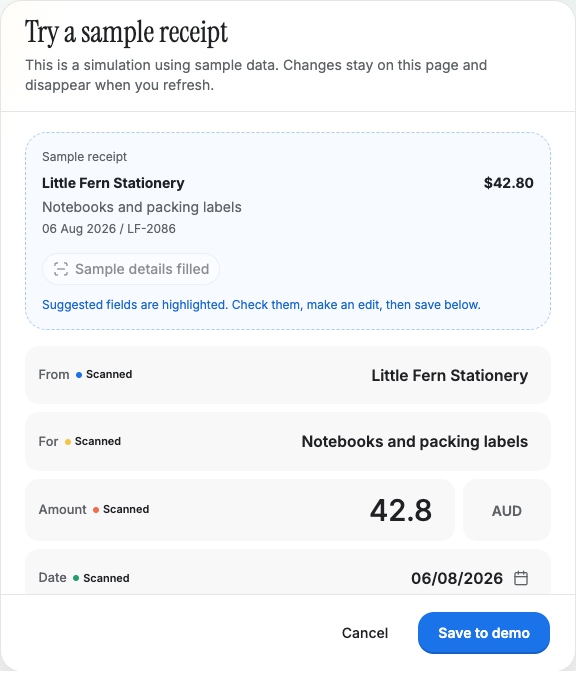
Read the receipt. Check the fields. Save the row.
Attach a photo or PDF
Add the receipt to an expense. The single-expense form scans attachments automatically; bulk import lets you select a batch, scan it and review every entry.
Review the suggestions
Compare the supplier, date, total and currency with the original. Correct a field, choose a useful category and add context before saving.
Keep the row and its evidence together
Saving adds the reviewed expense to the connected Sheet and uploads the receipt to the connected Drive folder. The expense retains a link to its original file.
One receipt, one expense you can find again.
For a fictional Little Fern Stationery receipt, the reviewed expense could contain these values. Gexpense's Sheet uses separate columns for each field.
- Date
- 6 August 2026
- Supplier
- Little Fern Stationery
- Description
- Notebooks and packing labels
- Amount and currency
- AUD 42.80
- Category
- Office supplies
- Invoice number
- LF-2086
| Date | Supplier | Amount | Currency | Drive file link |
|---|---|---|---|---|
| 2026-08-06 | Little Fern Stationery | 42.80 | AUD | Link to the original receipt |
Keep the original attached so a spreadsheet total is always traceable to the receipt. A category helps organise your records; it does not decide whether an expense is deductible.
See the complete receipt-to-Sheets walkthroughQuestions about receipt scanning
- Does Google Sheets scan the receipt itself?
- Gexpense reads the receipt and suggests the expense details. You review those fields in Gexpense, then save them to your connected Google Sheet.
- Can I use the expense tracker template with Gexpense?
- The free template is a separate workbook for manual tracking. Gexpense creates or connects a Sheet with its own expense layout during setup.
- What happens when a receipt is hard to read?
- Check each suggestion against the original and fill in missing details before saving. For bulk imports, a failed scan still produces an editable entry.